
Description
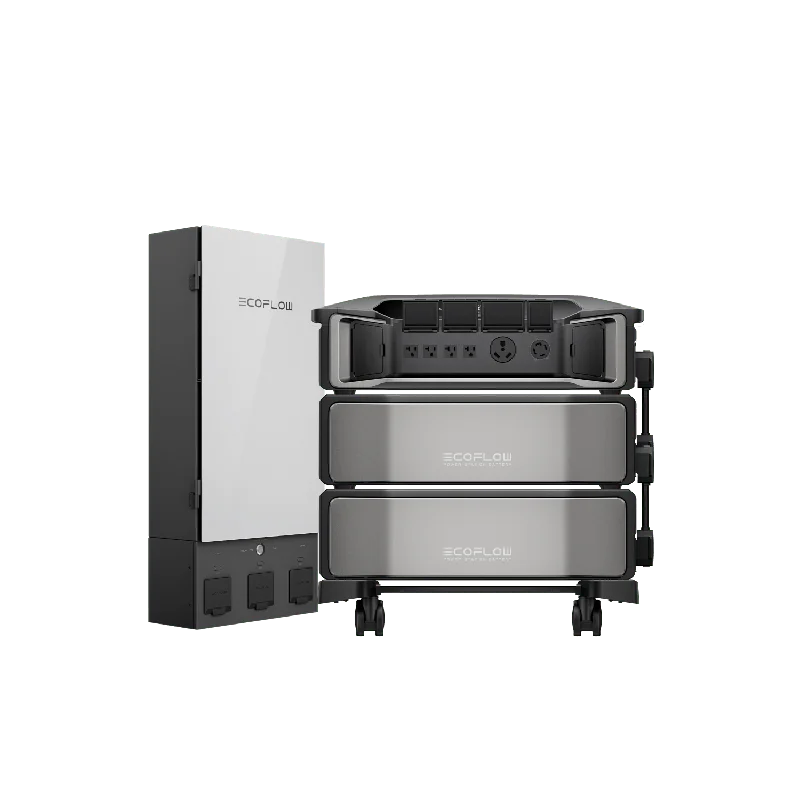
EcoFlow DELTA Pro Ultra + DELTA Pro Ultra Extra Battery + Smart Home Panel 2 (Web Exclusive) – SHP2-DPU-EB
EcoFlow DELTA Pro Ultra + Smart Home Panel 2 with EcoFlow’s Official Installation ServiceSecure your power from order to installation.
-7.2kW-21.6kW output with up to 3 inverters-Up to 90kWh capacity with 3 inverters and 15 batteries-5.6kW-16.8kW solar input with up to 3 inverters-Online UPS, 0-ms transfer time-LFP battery
What Our Experts Think
-
The EcoFlow DELTA Pro Ultra + Smart Home Panel 2 Starter Kit offers a comprehensive whole-home backup solution, combining high-capacity energy storage with intelligent power management.
-
Expandable Capacity: Start with 6kWh and scale up to 90kWh to meet your home’s energy demands.
-
High Output: Delivers up to 21.6kW AC output, capable of powering large appliances like a 4-ton central air conditioner.
-
Seamless Integration: The Smart Home Panel 2 ensures a 20ms auto-switchover during outages, providing uninterrupted power.
-
Smart Energy Management: Utilize features like Time-of-Use (TOU) mode, Self-Power mode, and Backup Reserve mode to optimize energy usage and reduce costs.
-
Remote Monitoring: Monitor and control your energy system via the EcoFlow app, providing real-time insights and control.
-
Clean Energy Incentives: Eligible for up to $2,099.70 in rebates through the 30% Residential Clean Energy Credit.
Q&A
Q: What is the total capacity of the system?
A: The system starts with 6kWh and can be expanded up to 90kWh, depending on the number of batteries added.
Q: How long does it take to fully charge?
A: Charging time varies based on input method; however, EcoFlow’s fast charging technology ensures minimal downtime.
Q: Is installation included?
A: Installation is not included; however, EcoFlow provides resources to assist with the installation process.
Q: Can I monitor the system remotely?
A: Yes, the EcoFlow app allows for real-time monitoring and control of your energy system.
Maintenance Tips
-
Regular Charging: Recharge the system every 3–6 months if not in regular use to maintain battery health.
-
Cleanliness: Keep the system and its components clean and free from dust and debris.
-
Firmware Updates: Regularly check for and install firmware updates to ensure optimal performance.
-
Professional Inspection: Schedule periodic inspections by certified professionals to ensure the system operates efficiently.

Reviews
There are no reviews yet.