
Description
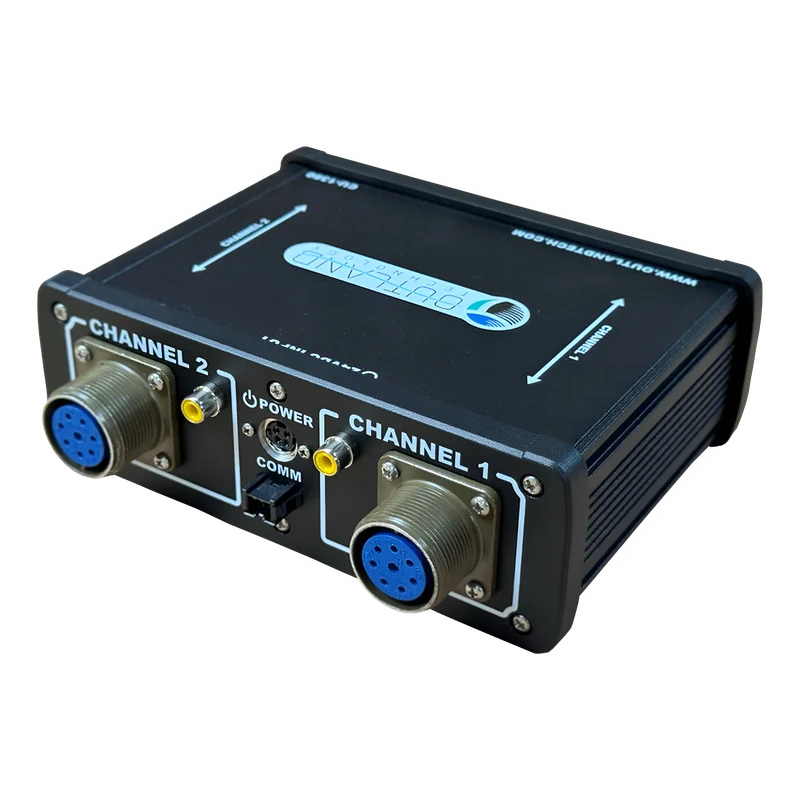
Outland Technology CU-1350 Dual Camera & Light Control – CU-1350
The Outland Technology CU-1350 is a streamlined, standalone control unit designed to manage dual cameras and lights with ease, all within a compact, durable case. For full control functionality, including advanced features like Smart Camera and Zoom Camera operations, pair your CU-1350 with the Outland DVR. This powerful combination ensures seamless integration and effortless control of your Outland devices.
What Our Experts Think
- Comprehensive Control: The Outland Technology CU-1350 allows seamless operation of both cameras and lights on ROV systems from a single interface.
- Dual Camera Support: Easily switch between and control two cameras for enhanced visibility and monitoring underwater.
- Integrated Light Control: Adjust light intensity to match varying underwater conditions, ensuring clear and detailed imaging.
- Rugged & Reliable: Built for harsh marine environments, ensuring dependable performance during extended operations.
- User-Friendly Design: Simple and intuitive controls reduce operator fatigue and improve efficiency.
Q&A
Q: What is the Outland Technology CU-1350 Dual Camera & Light Control?
A: The CU-1350 is a control unit that operates two underwater cameras and lights simultaneously, providing seamless monitoring and lighting control for marine operations.
Q: What makes it special?
A: It offers real-time video feed switching, adjustable light intensity, and intuitive controls for enhanced underwater visibility and data collection.
Q: What are the key features?
A: Dual camera input, light control with dimming, real-time video switching, and a durable, user-friendly design.
Q: Who is it for?
A: Designed for ROV operators, marine researchers, and underwater inspection professionals needing precise control over multiple cameras and lights.
Q: Is it easy to use?
A: Yes, it features straightforward controls and a rugged design for reliable operation in demanding environments.
Maintenance Tips
- Inspection: Regularly inspect connectors and cables for wear or damage to ensure reliable operation.
- Cleaning: Wipe the control unit with a soft, dry cloth; avoid harsh chemicals or moisture exposure.
- Connection Check: Ensure all connections are secure before each use to prevent signal loss.
- Firmware Updates: Keep firmware up to date for optimal performance and compatibility.
- Storage: Store in a cool, dry place away from moisture and extreme temperatures.
Reviews
There are no reviews yet.